

Instagram is one of the most popular social media platforms, but many users now want to take a break from social media or permanently remove their accounts for privacy, productivity, or personal reasons. If you are looking for a simple and updated guide on how to delete your Instagram account permanently, this article will help you step by step.
Whether you are using Android, iPhone, or desktop, this guide explains everything clearly.
Difference Between Deactivate and Delete Instagram Account
Before deleting your Instagram account, it is important to understand the difference between deactivation and permanent deletion.
Temporary Deactivation
- Your profile becomes hidden
- Photos, followers, and messages remain safe
- You can reactivate anytime by logging in again
Permanent Deletion
- Your account gets permanently removed
- Photos, videos, followers, chats, and data are deleted
- Recovery is only possible within the limited recovery period provided by Instagram
How to Delete Instagram Account on Mobile
Follow these simple steps to permanently delete your Instagram account using the Instagram app.
Step 1: Open Instagram App
Launch the Instagram application on your smartphone and log in to your account.
Step 2: Go to Profile
Tap on your profile picture located at the bottom right corner.
Step 3: Open Settings & Privacy
Click on the three-line menu and select “Settings & Privacy”.
Step 4: Open Accounts Center
Scroll down and tap on “Accounts Center”.
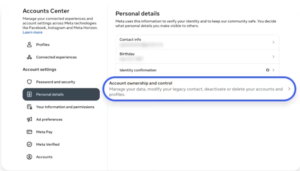
Step 5: Personal Details
Now go to:
- Personal Details
- Account Ownership and Control
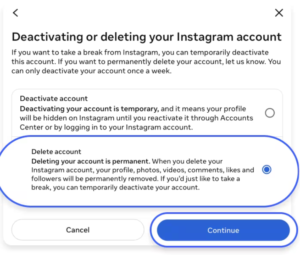
Step 6: Select Deactivation or Deletion
Choose the Instagram account you want to remove.
Step 7: Tap Delete Account
Select “Delete Account” and continue.
Step 8: Confirm Password
Instagram will ask for your password to confirm deletion.
Step 9: Account Deletion Request Submitted
Your account deletion request will be submitted successfully.
How to Delete Instagram Account on Desktop
You can also remove your Instagram account using a browser.
Steps for Desktop Users
- Visit Instagram official website
- Log in to your account
- Open Account Settings
- Go to Accounts Center
- Select Deactivation or Deletion
- Choose Delete Account
- Enter your password and confirm
Direct Instagram Delete Account Link
Instagram also provides a direct account deletion page for faster access.
Official Delete Link
https://www.instagram.com/accounts/remove/request/permanent/
Always make sure you are using the official Instagram website for account-related actions.
What Happens After Deleting Instagram Account?
Once your account deletion request is submitted:
Instagram Usually Provides a Recovery Period
- Your account becomes invisible immediately
- Instagram may provide around 30 days to recover the account
- After the recovery period, all data gets permanently deleted
Can You Recover a Deleted Instagram Account?
Yes, But Only Within the Recovery Period
If you log back into your account before the deletion deadline, Instagram may allow you to cancel the deletion request.
After the final deletion date, recovery becomes impossible.
Common Reasons People Delete Instagram
Many users choose to leave Instagram for different reasons.
Popular Reasons Include:
- Privacy concerns
- Social media addiction
- Mental health improvement
- Less screen time
- Creating a new account
- Business rebranding
Important Things to Do Before Deleting Instagram
Before permanently deleting your Instagram account, make sure to:
Backup Important Data
Download:
- Photos
- Videos
- Chats
- Reels
- Account information
Inform Your Followers
If your account is important for business or branding, inform your audience before deletion.
Frequently Asked Questions
How long does Instagram take to permanently delete an account?
Instagram usually takes around 30 days to permanently remove the account and all associated data.
Can I temporarily disable Instagram instead of deleting it?
Yes, Instagram allows temporary deactivation if you only want a break from social media.
Will messages disappear after deleting Instagram?
Your messages may still remain visible in other users’ inboxes even after account deletion.
Is deleting Instagram permanent?
Yes, after the recovery period ends, your account and data are permanently deleted.