

If you’re looking for how to delete Snapchat account permanently, this updated 2026 guide explains everything in simple steps—whether you’re using Android, iPhone, or desktop.
You cannot delete a Snapchat account directly from the app.
You must visit accounts.snapchat.com, log in, request deletion, and wait 30 days for permanent removal.
Why People Delete Snapchat Delete ?
-
Too many notifications & distractions
-
Privacy concerns
-
Not using the app anymore
-
Switching to other platforms
-
Want a digital detox
Things to Know Before Deleting Snapchat
Before you proceed, keep these points in mind:
-
🕒 30-day deactivation period (account can be recovered)
-
❌ After 30 days → account is permanently deleted
-
📸 Chats, memories, friends → deleted permanently
-
🔐 Username cannot be reused later
👉 Tip (India users): Make sure your mobile number & email are accessible during login.
How to Delete Snapchat Account (Step-by-Step)
Method 1: Delete Snapchat Account Using Mobile or Laptop (Recommended)
-
Open your browser (Chrome/Safari)
-
Go to accounts.snapchat.com
-
Log in using your Snapchat username & password
-
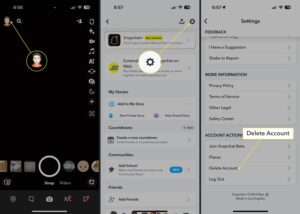
Click on Delete Account
-
Enter your login details again
-
Confirm deletion
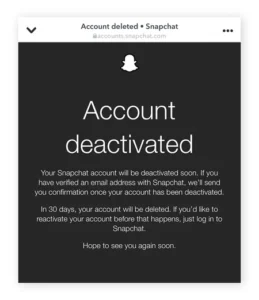
✅ Your account is now deactivated for 30 days
Method 2: Delete Snapchat Account from App (Indirect Way)
You can’t delete directly, but you can reach the delete page:
-
Open Snapchat app
-
Go to Profile → Settings
-
Tap Support → I Need Help
-
Search Delete Account
-
Tap the link → redirected to browser
-
Follow the same steps as Method 1
What Happens During the 30-Day Deactivation Period?
-
Your profile becomes invisible
-
Friends can’t contact you
-
Data is temporarily stored
-
If you log in again → account gets reactivated
⚠️ Important: Do NOT log in during these 30 days if you want permanent deletion.
How to Reactivate Snapchat Account
If you change your mind:
-
Open Snapchat app
-
Log in with the same username & password
-
Confirm reactivation
⏱️ Reactivation may take up to 24 hours
Can You Delete Snapchat Without Password?
❌ No.
You must know your username & password.
If forgotten:
-
Use “Forgot Password”
-
Reset via email or mobile number
Is Snapchat Account Deletion Permanent?
✔️ Yes, after 30 days
❌ No recovery possible after that
Snapchat Account Deletion – Common Problems & Fixes
Problem: Can’t log in
➡️ Reset password first
Problem: Delete option not showing
➡️ Use desktop browser, not in-app
Problem: Account reactivated accidentally
➡️ Logged in during 30 days
Frequently Asked Questions (FAQ – AEO Optimized)
❓ How long does Snapchat take to delete an account?
Snapchat takes 30 days to permanently delete an account after request.
❓ Can I delete Snapchat from India?
Yes, Snapchat account deletion works globally, including India.
❓ Will my friends know I deleted Snapchat?
No notification is sent. Your account simply disappears.
❓ Can I create a new account with the same email?
Yes, after permanent deletion—but username may not be reusable.